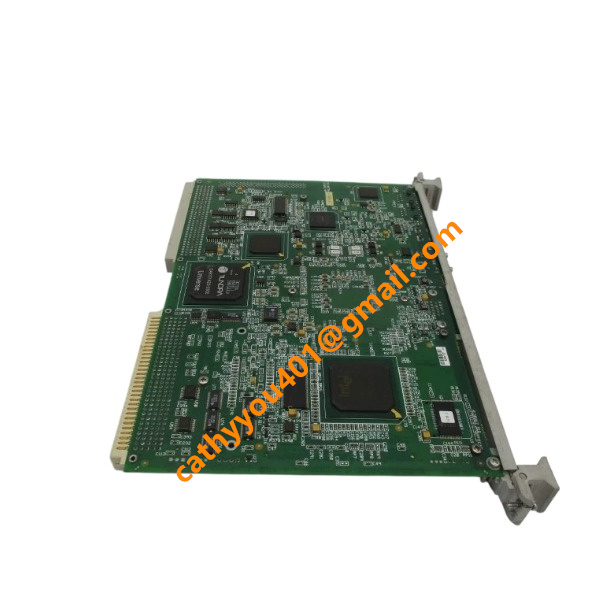
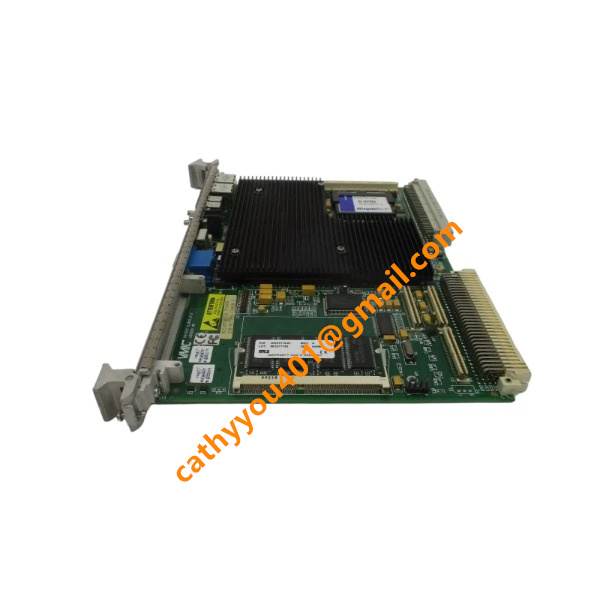







Description
-
BrandVMIC
-
ModelVMIVME-7750-734000
-
Product NameVMEbus Single Board Computer
-
Dimensions233.35 mm × 160 mm × 20 mm
-
Weight0.42 kg
-
Place of OriginUnited States
-
HS Code8471504090
-
Operating Temperature0 ℃ ~ +55 ℃
-
Storage Temperature-40 ℃ ~ +85 ℃
-
Power Supply+5 V DC, +3.3 V DC
-
Warranty12 month
-
Statusoriginal
Hardware Features of VMIC VMIVME-7750-734000
Processor & Chipset
CPU: Intel Pentium-III FC-PGA2 processor, 1.26 GHz, 512 KB on-die full-speed L2 cache
Front-side bus: 133 MHz
Chipset: Intel 815E GMCH chipset
PCI-to-VME Bridge: Tundra Universe-II transparent bridge, supports high-speed data conversion between PCI local bus and VME backplane
Memory Configuration
System RAM: One 144-pin SODIMM socket, maximum 512 MB PC133 SDRAM; memory supports dual-port access for VMEbus shared data exchange
Video memory: 4 MB dedicated display DRAM for onboard SVGA graphics controller
Non-volatile storage: IDE CompactFlash socket; also supports standard IDE hard-disk drive; NVRAM for BIOS configuration and system parameter storage
VMEbus Interface
VME specification: VMEbus Rev C.1, P1/P2 6U Eurocard dual connectors
Master mode: Supports A16/A24/A32 address space; D08/D16/D32 data width; BLT32, BLT64 block transfer
Slave mode: Full VME slave access, shared memory function for multi-CPU systems
VME interrupt handling: Complete VME IRQ interrupt controller, SYSFAIL error monitoring
System controller capability: Can provide VME bus arbitration, system clock and reset signals when assigned to Slot 1
On-board I/O Interfaces (Front-panel)
Dual 10/100 Mbps Ethernet (RJ45), auto-negotiation 10Base-T /100Base-TX
SVGA VGA video port, maximum resolution up to 1600×1200, compatible with EGA / SVGA / VESA standards
Two RS-232 serial debug ports (D-9 connectors)
Dual USB 1.1 host ports
Reset push-button switch
Multi-function status LED indicators: Power LED, Reset LED, LAN activity, IDE access, VME SYSFAIL fault indicator
Expansion Interface
Single PMC mezzanine expansion site, conforming to PMC standard
Provides +5 V / +3.3 V power for PMC module; supports rear I/O routing through VME P2 connector
PMC maximum load: 1.5 A for +3.3 V, 1.5 A for +5 V
Power Requirements (Supplied by VME backplane)
+5 VDC: typical 5.8 A, max 7 A
+12 VDC: typical 105 mA, max 200 mA
-12 VDC: typical 50 mA, max 75 mAArtisanTG
Mechanical & Environmental
Form factor: 6U VME single-slot Eurocard; dimension: 233.4 mm × 160 mm
Cooling requirement: Minimum 350 LFM forced-air airflow across onboard heat sink
Operating temperature: 0 ℃ ~ +55 ℃
Storage temperature: −25 ℃ ~ +80 ℃
Relative humidity: 10%-90% non-condensing
Industrial rugged design, optimized for continuous 24-7 embedded operation for industrial control, test-simulation and defense applicationsArtisanTG
Supported Operating Systems
Compatible with multiple industry-standard operating systems: VxWorks, embedded Linux, QNX, LynxOS, Windows NT, Windows 2000.

Commissioning Steps for VMIC VMIVME-7750-734000 VME Single-Board Computer
Safety and Pre-installation Check. Disconnect the entire VME chassis power supply. Wear an anti-static wrist strap to guard against electrostatic discharge damage. Inspect the module for any mechanical defects. Confirm that the part number VMIVME-7750-734000 and hardware revision comply with project specifications. Make sure the P1/P2 dual-port VME backplane is in good condition.
Slot Configuration Confirmation. Select a suitable 6U Eurocard slot. Deploy the board in Slot 1 if it will serve as the VME system controller. For systems with an alternative system-controller module, install it in any other vacant slot. Guarantee adequate airflow across the heat sink; a minimum cooling airflow of 350 LFM is mandatory.
Module Mechanical Installation. Align the circuit board with chassis guide rails. Slide VMIVME-7750-734000 smoothly into position until the P1-P2 connectors are fully engaged with the VME backplane. Secure the injector-ejector handles and fasten the front-panel mounting screws.
Front-panel Peripheral Connection. Connect required external peripherals, including a VGA monitor, PS/2 keyboard, serial debug terminal cable and Ethernet cables. Insert the CompactFlash storage medium for operating-system booting. Do not energize the chassis at this point.

Power-on and POST Self-test. Double-check module installation and external wiring integrity before powering up the chassis. Monitor BIOS POST information via the display or serial console. Observe onboard status LEDs and confirm that the CPU, memory and chipset complete power-on self-diagnostics successfully. Document the BIOS version.
BIOS Parameter Setup. Access the BIOS setup menu. Review and adjust system date-time, boot priority order, memory settings, VME bridge configurations, interrupt assignments and PMC-slot-related options. Restore factory-default settings in case of unknown configuration conflicts. Save updated BIOS parameters and reboot the single-board computer.
Operating-System Boot Verification. Ensure stable booting from CompactFlash or the defined boot device. Monitor console outputs to confirm the OS kernel loads without crashes or exceptions. Validate hardware recognition of local components: system RAM, dual onboard Ethernet ports, serial interfaces, PMC expansion slot and PCI-to-VME bridge.
VME Backplane Interface Commissioning. Set up address mapping, interrupt modes and access-window parameters for the PCI-VME bridge within the operating system or corresponding driver. Perform read-write tests targeting other VME slave modules on the backplane. Verify reliable data transmission and interrupt responses over the VME bus.
Peripheral Function Test. Validate communication performance of dual-channel Ethernet, including link status and IP-based connectivity. Confirm transmit-receive functionality of the serial debug port. Execute memory read-write tests to identify potential SDRAM hardware faults. If a PMC mezzanine card is fitted, verify normal operation of the PMC expansion slot.
Application-level Function Validation. Deploy the end-user application or target real-time runtime environment such as VxWorks or Embedded Linux. Run the full application startup sequence. Verify data interaction between the SBC and distributed VME I/O modules, and check task scheduling as well as real-time performance. Monitor system runtime behaviour to rule out unexpected resets or system crashes.
Fault Diagnosis if Abnormality Occurs. Analyze POST error codes, BIOS warning records and exception messages from the serial console. Re-evaluate slot allocation, cooling performance, factory jumper settings and backplane contact reliability. Ensure firmware and software releases are compatible with the VMIVME-7750-734000 hardware variant.
Final Acceptance & Documentation. Confirm all hardware interfaces, VME-bus communications and application-specific features operate in accordance with design requirements. Create backups for BIOS configurations, OS images and application files. Complete the commissioning log with firmware versions, test results and slot location information. Neatly arrange cabinet-internal cabling and finish site acceptance procedures.

UKB-3-35E
MFT-06
H1111.0204
HC-RFS353K
85UVF1‑1CEX
SH31004P12A2000
PW482‑50 S2
PW484-50 S1
AAR181-S50 S2
AAI143-H50 S1
85UVF1-1QD
CCM10


.jpg)

.jpg)